Posts

Automatically mount NVME volumes in AWS EC2 on Windows with Cloudformation and Powershell Userdata

Introduction This post explains how I go about with AWS Cloudformation and Powershell userdata scripts. attaching EBS volumes to Windows EC2 instances identifying them in the OS initializing them formatting them and assigning labels and drive letters. Prerequisites You should know something about Cloudformation and Powershell. The AWS Image you use for your EC2 instance should be one provided by AWS and should have the following utility already deployed to  C:\ProgramData\Amazon\Tools\ebsnvme-id.exe AWS Cloudformation Step I typically do not declare EBS Volumes together with the EC2 Instance declaration in Cloudformation but prefer to declare them as separate resources along with their own ebs attachment resources.  Here is an example EC2 instance with three additional volume declarations on top of the root volume which is automatically mounted on C:\ WindowsServerInstance: Type: AWS::EC2::Instance Properties: BlockDeviceMappings: - DeviceName: /dev/sda...
ASUS USB-N10 Nano on OpenSuse 13.1 Linux

Today I bought myself a wifi adapter for my Opensuse desktop PC. I was tired of running a network cable across the carpet to my modem. The model I bought was an ASUS USB-N10 Nano from PB Technologies in Henderson. It was less than $20 so I thought a good deal. When I bought it, I completely ignored all the printed garbage about support for Windows and Mac and figured, that it will be supported under linux. It is supported under Linux but it was not too simple to set up on my Opensuse. In the end and after much google-ing, I found this repository: https://github.com/pvaret/rtl8192cu-fixes The driver that ships with the kernel is not so hot. The network keeps dropping even though it appears to remain connected. With this version, things are much more stable. Also it compiles nicely under the latest kernel. The proprietry driver from Realtek did not compile under the kernel shipped with Opensuse 13.1. So here is what I ended up doing: ~ git clone https://github.com/pv...

Restrict Commands executed via pre-shared SSH keys

Introduction Using pre-shared SSH keys is a great way to make logging into remote hosts quick and easy.  No pesky passwords to remember.  The downside is that if your organization relies on passwords for access control, the pre-shared key will negate any password control you have.  For example: If your organization rolls a password for a system account, and the new password is not shared with all the original people, then some people who should not have access any more will continue to have access via their pre-shared key. Also, anyone with access to a user's account on a client host, could access the system account via the pre-shared key on the remote host.  This is not ideal. Sometimes, it is neccessary to allow certain commands only to be executed over SSH from specified client hosts without a password.  Especially when thinking about automated tasks. In my examples, I will demonstrate how we can create a simple remote procedure call type scenario using ...

Python suds (SOAP Library) does not support SSLv3

The Oracle Virtual Machine (OVM) manager exposes a SOAP (wsdl) web-service. At the time of writing this can be found here: (for version 3.2.x) https://<hostname>:7002/ovm/core/wsapi/soap?wsdl You can access this url in your web browser and will be prompted to accept the self signed cert etc.  (There is a way to add a real certificate but that's not what this article is about.) In order to consume this webservice in python, I thought to try out the (now quite old) "suds" library.  Opensuse still ship this library and you can install it with: zypper in python-suds EDIT: I have added the forked library to github here: https://github.com/linuxplayground/suds-sslv3-fork The problem I found was that when trying to connect to the service, I was receiving an exception error around SSL. Here is how it looked... The example code: #!/usr/bin/python from suds.client import Client client = Client(url='https://ovm:7002/ovm/core/wsapi/soap?wsdl') print cli...

Simple symmetric / Shared key encryption tutorial

I was looking for a way to explain cryptography to my 8 year old son this evening and we devised a simple share key encryption / decryption method.  The key is symmetrical because both sides have the same key  and the same key is used for both encrypting and decrypting. We took a simple ceasar cipher and extended it slightly by creating a stronger key.  Something like this: Plain Text = HELLO WORLD Key = [2, -5, 3, 7] to encrypt we take the positional value for each letter and apply the replacement for the next key bit in turn.  For example: Start at keybit = 1 [2] H = 8, H + 2 = 10, 10 = J keybit = 2 [-5] E = 5, E - 5 = 0 (26), 26 = Z keybit = 3 [3] L = 12, 12 + 3 = 15, 15 = O keybit = 4 [7] L = 12, 12 + 7 = 19, 19 = S Now start at key bit =1  O = 15, 15 + 2 = 17, 17 = Q and so on. So long as the same key is used for decryption the thing works a treat. So I explained that simple key can be made an...

Samba4 Windows AND Linux authentication

Introduction This post describes all the millions of configuration files you need to set up on a CLIENT LINUX server / machine in order to ssh to it with your domain credentials. I have this working in a LAB environment with the following caveats: SELINUX disabled (work on this required) Firewall Disabled (not hard to fix this if required) DNS Setup not working completely for Forwarding to external Nameserver by Samba4.  Don't know why. (more investigation required) You will need to have a user called binduser which has permissions in AD to look up other users.  I am sure there is documentation on this around somewhere :) Install packages yum -y install samba-winbind pam_ldap pam_krb5 nss-pam-ldapd oddjob-mkhomedir bind-utils Configure openldap (/etc/openldap/ldap.conf) [root@linuxclient ~]# cat /etc/openldap/ldap.conf # # LDAP Defaults # # See ldap.conf(5) for details # This file should be world readable but not world writable. #BASE dc=example,dc=...

Disable the touch pad while typing on Linux

The Problem: If you have a Synaptics touch-pad like the one I have on my HP ProBook 6560b, you might want to learn how to disable the touch-pad while typing. This particular laptop has a touch-pad that is positioned poorly so it is common for your palm to be in contact with the pad while you type. The solution is to disable it for 2 seconds while typing. It is a minor inconvenience to have to wait two seconds to use it again but at least your typing is uninterrupted which could be a major inconvenience.  The solution: Use the syndaemon tool that ships with the synaptics packages. In my case they shipped by default. You could always try the gui... david.latham@davepc:~> cat bin/touchpad.sh #!/bin/bash syndaemon -k -i 2 -d Now just configure your desktop manager to run this script on start up. It is a trivial thing to do in KDE under system settings -> Sartup and Shutdown, Add Script...

Firewall Script for openSuSE and others

openSuSE and, I guess, Fedora have introduced their own firewall (iptables) configuration guis and services that try to make the job of configuring iptables easy.  While that might be useful in a standard desktop environment, I found that it didn't do much for my Virtualbox nat . I couldn't create the masqerade rules very easily and I didn't want all the extensive rules governing types of ICMP traffic and logging.  As the SuSEfirewall2 service GUI didn't help and the configuration files were too complicated for this old school blogger, I decided to roll my own script. On my system, I simply disable the SuSEfirewall2 service and then call this script on boot. You can find this script and any changes I make to it on my github .  Of course, I won't be putting every rule I have in place online, that would be a crazy security risk.  I just wanted to show the basics that can be easily extended by adding more rules into the filter section. #!/bin/bash IPT=/usr/sbi...

Reset the Oracle XE database password for OVM 3.1.1.

You have installed Oracle OVM with the bundled XE database and after a time, you find that you can no longer log into the OVM Admin console. You get an error similar to: Unexpected Error logging in.  Consult logs... What has probably happened is that the ovs database password has expired in XE.  Now using the XE environment is unsupported and for demo purposes only.  In fact the new version of OVM ships with a bundled MySQL database and no longer the XE.  Even better, the bundled MySQL database is supported in production environments.  So this post is obsolete even before I finish writing it. To be sure you are facing this problem, grep for OVMDS in /u01/app/oracle/ovm-manager-3/machine1/base_adf_domain/servers/AdminServer/logs/AdminServer.log ####<Jan 28, 2013 12:19:51 PM NZDT> <Warning> <JDBC> <ovm.e-it.co.nz> <AdminServer> <Odof Tcp Client Thread: /127.0.0.1:54321/128430> <<anonymous>> <> <0000J...

Extending the AD Schema on Samba4 - Part 2

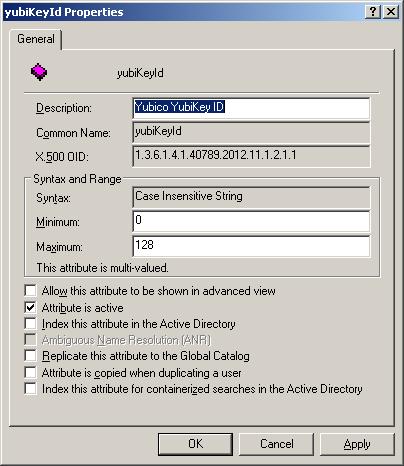
Importing LDIF files into Samba4 and Active Directory This is part 2 of the Extending AD Schema on Samba4 series.  The examples below are tested using the Samba4 LAB I created.  If you want more information on how that works then please read  http://david-latham.blogspot.co.nz/2012/12/samba4-ga-release-virtualbox-lab.html For part one, please read http://david-latham.blogspot.co.nz/2012/12/extending-ad-schema-on-samba4.html Unfortunately the format of an ldif file for creating new attributes and classes in the Schema Configuration are differ between Samba4 and Microsoft. The tools are slightly different too.  So this article will attempt to make it all clear. Find all the latest versions of code on this post at  https://github.com/linuxplayground/yubikey-ldap/tree/master/microsoft-schema Samba4 - ldbadd & ldbmodify As far as I can tell the only way to create a new class with a custom attribute in Samba4 (on the Linux command line) is first add ...

Extending the AD Schema on Samba4 - Part 1

Image
My last post on Samba4 showed how easy it is to install and configure an AD Service on Linux.  If you've not read it then please have a look. ( http://david-latham.blogspot.co.nz/2012/12/samba4-ga-release-virtualbox-lab.html ) This post show's how to extend the Samba4 Active Directory Schema.  Specifically for YubiKey integration. YubiKey's can be purchased for a relativlely low price from Yubico.  Please visit their website (www.yubico.com) for more information. LDAP Integration is very well covered by Michal Ludvig on his website and github.  ( http://www.logix.cz/michal/devel/yubikey-ldap/ ) In fact we are planning to leverage his implementation at our work and are considering donating towards what's obviously a very good cause. Now seeing as though LDAP and AD are so similar and exhibit many of the same APIs, I began to wonder how this might fit in with Samba4.  Eventually we might end up using Samba4 for our domain and so I needed to figure out if ...

Samba4 GA Release - Virtualbox LAB

Image
Introduction Configuring Samba has always been a pain in the you-know-what.  There is always some kind of permission here or there missing or misconfiguration resulting in endless hours of log trawling and frustrated users. My profile photo on this blog was taken during just such a time... So I decided to build a LAB for Samba 4.  My LAB is for a fresh install.  I have not yet tried an upgrade.  Maybe that will come in a later post. The Samba4 how-to on their WIKI is very good and formed the basis of most of the work.  ( http://wiki.samba.org/index.php/Samba4/HOWTO ) Lab Environment LAB Built on Virtual Box using Ubuntu 12.04 LTS Samba Server CentOS 6.3 x86_64 - Text based minimal install 512mb RAM 4GB OS (default partition layout from installer) 8GB Secondary disk 1xNIC on Host Only Adapter (Use dnsmasq on your host machine as per:  http://david-latham.blogspot.co.nz/2012/05/create-nat-for-virtualbox-host-only.html 1xNIC on Internal Onl...

Oracle Cloud Control

I had the occasion recently to deploy an OVM stack at a customer site.  Initially it was my intention to only deploy Enterprise Manager 12c and take advantage of the cloud control features within.  As it turned out, this provides merely a "remote control" function of an existing OVM Manager.  With this in mind, I could not find many advantages to using EM12c for Oracle virtual machine management. The next hurdle was with the hardware.  Of course, the physical servers we deployed the OVS 3.1.1. hyper-visor on were not "Oracle Certified."  Specifically DELL PowerEdge M620 Blade Servers.  ( http://www.dell.com/us/enterprise/p/poweredge-m620/pd?~ck=anav ) The customer had selected the Broadcom®  57810S-k Dual Port 10Gb KR blade NDC on board Network Adapter as well as the Mezzanine Broadcom 5719 Serdes Quad Port 1Gb providing a total of 6 ethernet ports, two of them 10GB. The storage array is Equalogic iSCSI SAN.  (S...

Oracle Virtual Machine (OVM) LAB on VirtualBox

Oracle Virtual Machine (OVM) 3.1.1. was released on the 8th May 2012 and finally it's supported on VirtualBox.  This is great news for anyone who wants to give installing an OVM Lab a go. I gave it a go. I created 3 VirtualBox guests: Openfiler for iSCSI with a 40GB virtual disk for chopping up into LUNs and iSCSI. Oracle Linux 6.0 on which I installed OVM 3.1.1. in Demo mode.  This guest has 4GB of RAM assigned to it and a 25GB HD.  Probably a bit big, but OVM is a large application with an Oracle XE database and Oracle Weblogic services installed, I thought better safe than sorry. Oracle Virtual Server 3.1.1.  This guest had just a 4GB HD and 1536MB of RAM which I figured would be just enough to get 1 virtual machine up and running on it. My VirtualBox is configured with a couple of host only networks: vboxnet0 => 192.168.56.0/24 => Management network.  I also have dnsmasq configured on this network to serve IP addresses via DHCP to clients o...