Posts

Simple symmetric / Shared key encryption tutorial

I was looking for a way to explain cryptography to my 8 year old son this evening and we devised a simple share key encryption / decryption method.  The key is symmetrical because both sides have the same key  and the same key is used for both encrypting and decrypting. We took a simple ceasar cipher and extended it slightly by creating a stronger key.  Something like this: Plain Text = HELLO WORLD Key = [2, -5, 3, 7] to encrypt we take the positional value for each letter and apply the replacement for the next key bit in turn.  For example: Start at keybit = 1 [2] H = 8, H + 2 = 10, 10 = J keybit = 2 [-5] E = 5, E - 5 = 0 (26), 26 = Z keybit = 3 [3] L = 12, 12 + 3 = 15, 15 = O keybit = 4 [7] L = 12, 12 + 7 = 19, 19 = S Now start at key bit =1  O = 15, 15 + 2 = 17, 17 = Q and so on. So long as the same key is used for decryption the thing works a treat. So I explained that simple key can be made an...
Samba4 Windows AND Linux authentication

Introduction This post describes all the millions of configuration files you need to set up on a CLIENT LINUX server / machine in order to ssh to it with your domain credentials. I have this working in a LAB environment with the following caveats: SELINUX disabled (work on this required) Firewall Disabled (not hard to fix this if required) DNS Setup not working completely for Forwarding to external Nameserver by Samba4.  Don't know why. (more investigation required) You will need to have a user called binduser which has permissions in AD to look up other users.  I am sure there is documentation on this around somewhere :) Install packages yum -y install samba-winbind pam_ldap pam_krb5 nss-pam-ldapd oddjob-mkhomedir bind-utils Configure openldap (/etc/openldap/ldap.conf) [root@linuxclient ~]# cat /etc/openldap/ldap.conf # # LDAP Defaults # # See ldap.conf(5) for details # This file should be world readable but not world writable. #BASE dc=example,dc=...

Disable the touch pad while typing on Linux

The Problem: If you have a Synaptics touch-pad like the one I have on my HP ProBook 6560b, you might want to learn how to disable the touch-pad while typing. This particular laptop has a touch-pad that is positioned poorly so it is common for your palm to be in contact with the pad while you type. The solution is to disable it for 2 seconds while typing. It is a minor inconvenience to have to wait two seconds to use it again but at least your typing is uninterrupted which could be a major inconvenience.  The solution: Use the syndaemon tool that ships with the synaptics packages. In my case they shipped by default. You could always try the gui... david.latham@davepc:~> cat bin/touchpad.sh #!/bin/bash syndaemon -k -i 2 -d Now just configure your desktop manager to run this script on start up. It is a trivial thing to do in KDE under system settings -> Sartup and Shutdown, Add Script...

Firewall Script for openSuSE and others

openSuSE and, I guess, Fedora have introduced their own firewall (iptables) configuration guis and services that try to make the job of configuring iptables easy.  While that might be useful in a standard desktop environment, I found that it didn't do much for my Virtualbox nat . I couldn't create the masqerade rules very easily and I didn't want all the extensive rules governing types of ICMP traffic and logging.  As the SuSEfirewall2 service GUI didn't help and the configuration files were too complicated for this old school blogger, I decided to roll my own script. On my system, I simply disable the SuSEfirewall2 service and then call this script on boot. You can find this script and any changes I make to it on my github .  Of course, I won't be putting every rule I have in place online, that would be a crazy security risk.  I just wanted to show the basics that can be easily extended by adding more rules into the filter section. #!/bin/bash IPT=/usr/sbi...

Reset the Oracle XE database password for OVM 3.1.1.

You have installed Oracle OVM with the bundled XE database and after a time, you find that you can no longer log into the OVM Admin console. You get an error similar to: Unexpected Error logging in.  Consult logs... What has probably happened is that the ovs database password has expired in XE.  Now using the XE environment is unsupported and for demo purposes only.  In fact the new version of OVM ships with a bundled MySQL database and no longer the XE.  Even better, the bundled MySQL database is supported in production environments.  So this post is obsolete even before I finish writing it. To be sure you are facing this problem, grep for OVMDS in /u01/app/oracle/ovm-manager-3/machine1/base_adf_domain/servers/AdminServer/logs/AdminServer.log ####<Jan 28, 2013 12:19:51 PM NZDT> <Warning> <JDBC> <ovm.e-it.co.nz> <AdminServer> <Odof Tcp Client Thread: /127.0.0.1:54321/128430> <<anonymous>> <> <0000J...

Extending the AD Schema on Samba4 - Part 2

Importing LDIF files into Samba4 and Active Directory This is part 2 of the Extending AD Schema on Samba4 series.  The examples below are tested using the Samba4 LAB I created.  If you want more information on how that works then please read  http://david-latham.blogspot.co.nz/2012/12/samba4-ga-release-virtualbox-lab.html For part one, please read http://david-latham.blogspot.co.nz/2012/12/extending-ad-schema-on-samba4.html Unfortunately the format of an ldif file for creating new attributes and classes in the Schema Configuration are differ between Samba4 and Microsoft. The tools are slightly different too.  So this article will attempt to make it all clear. Find all the latest versions of code on this post at  https://github.com/linuxplayground/yubikey-ldap/tree/master/microsoft-schema Samba4 - ldbadd & ldbmodify As far as I can tell the only way to create a new class with a custom attribute in Samba4 (on the Linux command line) is first add ...

Extending the AD Schema on Samba4 - Part 1

Image
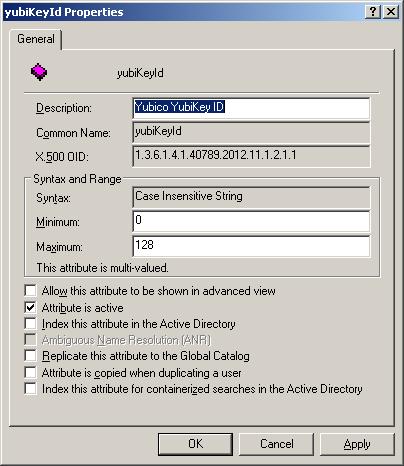
My last post on Samba4 showed how easy it is to install and configure an AD Service on Linux.  If you've not read it then please have a look. ( http://david-latham.blogspot.co.nz/2012/12/samba4-ga-release-virtualbox-lab.html ) This post show's how to extend the Samba4 Active Directory Schema.  Specifically for YubiKey integration. YubiKey's can be purchased for a relativlely low price from Yubico.  Please visit their website (www.yubico.com) for more information. LDAP Integration is very well covered by Michal Ludvig on his website and github.  ( http://www.logix.cz/michal/devel/yubikey-ldap/ ) In fact we are planning to leverage his implementation at our work and are considering donating towards what's obviously a very good cause. Now seeing as though LDAP and AD are so similar and exhibit many of the same APIs, I began to wonder how this might fit in with Samba4.  Eventually we might end up using Samba4 for our domain and so I needed to figure out if ...